Resources & Tips
Here lies a collection of resources & tips I've amassed over the years; use them well.
With that in mind, there are thousands of other resources on the internet that I can't cover here. Use youtube, reddit, discord, whatever works for you!
If a guide doesn't seem to work, try it again. If it really doesn't work, try another guide! The magic of it is to keep at it, because if so many other teens can do it, you absolutely can too.
KiCad Libraries
- Hack Club's KiCAD care package!
- More Keyswitch footprints
- XIAO Footprints
- Rotary Encoder footprint
- 0.91" OLED Display
- You can almost always find the footprint/symbol you're looking for if you use SnapEDA or similar sites. Google is your best friend.
Top Tier
- The Keyboard Atelier Discord <- THE community for keyboard design! PLEASE do not spam the discord though, your best shot is to lurk.
- The Keyboard Designer Wiki <- this is insanely useful
- Atelier designer spreadsheet
- I made an example macropad in the GitHub repo here. It has an OLED, a rotary encoder, 4 switches in a matrix, 2 addressable LEDs, and QMK firmware. You can reverse engineer it for pretty much everything else
Tutorials
- Joe Scotto's how to design a PCB
- Joe Scotto's how to design a keyboard case
- ai03's PCB Guide (this is what I learned from!)
General info
Useful measurements & other info
- Making holes for your PCB:
- KiCAD has specific footprints for mounting holes, don't use Edge.Cuts - use the M3 mounting hole footprint!
- Making holes for your case:
- if you're using heatset inserts, make a 4.7mm diameter hole, 4mm deep
- if you're screwing directly into the plastic, use a 2.9mm diameter hole
- if you just want the screw to pass through without threading, use a 3.4mm diameter hole.
- Use a 0.2mm gap between 3D printed parts
- There's 19.05mm gap between the center of each switch
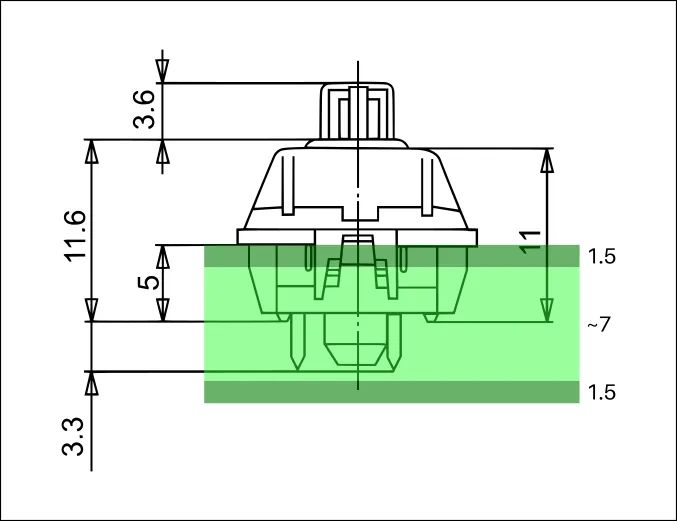
- This image shows general height measurements
3D models
- Cherry MX Keycaps
- Keyswitches
- Stabilizers
- EC11 Rotary Encoder
- Generally speaking, go to grabcad and search for your part + sort by popular, and you should be able to find the model you need
Generally useful tips
- Most DIY keyboards are at least partially open source. You can go to their git repositories and copy their tolerances/footprints/schematics/whatever
- You can export your KiCad PCB to a PDF and print them to check measurements!
- Most Keyboards are wired in a matrix to save pins, but if you have 6 or less switches just avoid the matrix altogether
- For screens, just use a 4-pin header for footprints
- Adding graphics in KiCad is really annoying. Instead, you can design your entire thing in Figma and import it as an overlay instead
- Google is your best friend. 9 times out of 10 the first result will help you out.
- Try routing everything on one layers first, if you can't without making a big loop, move to the second layer. This keeps your board clean.
- Make multiple revisions! I rerouted my first macropad like 10 times while adding stuff.
- After routing everything, run Tools > Cleanup Tracks & Vias. You gotta press the Build changes button twice for the optimizations to apply.