Timagotchi
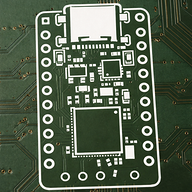
This is my magnum opus at 14, the Timagotchi. it uses a raspberry pi zero wh and a waveshare LCD hat. It tells you how much time you have left in your classes, mainly to help with adhd time management, checks grades via canvas, and much more. now that i am no longer being judged, i will say i hid doom and tetris inside the dev menu. this podiumed at my reigonal MESA national engineering design competition, i got 4 awards at my reigonal science fair including 1st prize for engineering and a certificate of achievment from the US air force. for more info and documentation, please check out timagotchi.dev, the website i made for it. i also tried to make a pcb and failed miserably, because i went in blind but i may try to continue that in the future. it also has a 3d-printed case that i honestly kinda hate but it works.
Created by
 Joseph (propeller hat guy)
Tier 3
22 views
0 followers
Joseph (propeller hat guy)
submitted Timagotchi for ship review ago
Joseph (propeller hat guy)
submitted Timagotchi for ship review ago
Joseph (propeller hat guy)
added to the journal ago
PROJECT APPROVED!!!!!!!!!!
Oh my god. dude. it actually got approved. i got 715 tickets for my project, which is less than tier 3 but understandable as this is not a hardware project. I am currently on vacation in europe which makes this even better. I cannot express my gratitude toward hack club and blueprint for giving me the motivation to make this project and i learned soooo much. in just the last 5 days i learned:
Nanofarans in capacitors
Polarized vs unpolarized capacitors
pullup and pulldown resistors
decoupling capacitor
kicad footprints and symbol libraries
gpio strapping pins
vcc does not power blk
erc checking
polyfuses
vbus
CC & sheild on USB-C connectors
usb plug vs receptacles
sideband use
SMD
Resistor sizing like 0405 vs 0805
Just from trying (and failing) to design a pcb.
I won 4 awards including 1st in engineering in my regional science fair and placing podium in MESA NEDC from this project, and i learned sooo much about coding, pcbs, product design, and documenting.
anyway to make this a real journal, I updated the website to say said achievments and say "Blueprint approved" at the top.
I now have a new Ender 3 Awaiting me when i get home, and i am so so grateful for the oppurtunity to learn and grow in making and get paid for it, which is exactly what hack club is supposed to be. Thank you so much.
 CAN ⚡🚀
approved Timagotchi ago
CAN ⚡🚀
approved Timagotchi ago
Tickets awarded: 715 tickets
Tier: 3
Awesome project!
CAN ⚡🚀
submitted Timagotchi for ship review ago
Joseph (propeller hat guy)
submitted Timagotchi for ship review ago
 alexren ⚡🚀
requested changes for Timagotchi ago
alexren ⚡🚀
requested changes for Timagotchi ago
hey - did you track this with hackatime? this project is almost entirely code so it would be very useful to know
Tier: 3
Joseph (propeller hat guy)
added to the journal ago
Finalized parts and schematic.
Decided to switch from ST7735S oled screen to ST7789 bc it's basically the same price with higher pixel count. im gonna use PSP style joysticks bc they look really sleek. it's gonna have a speaker, and volume buttons.  I finished the schematic with no errors and only warnings about footprints, which are fine. it does not have a speaker, battery, or usb-c yet, but it's just gonna be a test board to make sure stuff works, so i'll do the rest later.
gonna put this journal in just cause but ill keep working after this on routing and footprint stuff. it should be done by Wednesday.
Joseph (propeller hat guy)
added to the journal ago
Started PCB Schematic

I started learning pcb design, and i learned a bunch of stuff about hardware electronics. i wont be able to get my pcb by the time blueprint ends, but i will try to finish the PCB.
I learned about Polarized vs unpolarized capacitors, they have no difference but polarized are worse, what a nanofaran measures, pullup and pulldown resistors, and decoupling capacitors. i may start a new gh repo for the v2 because they will be different code bc one is linux and one is micropython, but idk. i will work more on this tomorrow. Very productive today :)
Joseph (propeller hat guy)
added to the journal ago
Working on Custom PCB + News
been a minute, glad to say i won 4 awards for this project at my reigonal science fair, including one from the air force, which is cool asf. uhh i worked a ton on slides and demos and all that but idk if that counts. i really hope this project gets accepted, but im planning to make a pcb with the requirments in the photo. idk why but adhd meds make me go crazy on designing new stuff. 
Im working on a BOM for components also. its ai rn cuz not final but its gonna be real later.
<!--StartFragment-->
Timagotchi PCB — Bill of Materials
ESP32-S3 custom PCB for Timagotchi school scheduler
Target budget: under $25 | Battery life: 14+ hours
| Component | Part Number | Description | Est. Cost
-- | -- | -- | -- | --
1 | SoC | ESP32-S3-WROOM-1U (8MB) | Module with built-in antenna, native USB, WiFi/BT | ~$3.50
2 | Display | 1.44" ST7735S 128×128 SPI | Same driver as Waveshare HAT — minimal code changes | ~$2.50
3 | Battery | 3.7V 2000mAh LiPo (JST-PH 2.0) | 14hr+ battery life at typical load (~100mA avg) | ~$5.00
4 | Charger IC | MCP73831T-2ACI/OT | LiPo CC/CV charger, SOT-23-5, 500mA charge rate | ~$0.40
5 | LDO Regulator | AP2112K-3.3TRG1 | 3.3V reg from battery (3.7–4.2V in), 600mA, low dropout | ~$0.20
6 | Joystick | SKQUCAA010 (Alps 5-way) | Same family as Waveshare HAT joystick | ~$0.80
7 | Tactile Buttons | TS-1187A (×3) | 6mm SMD, for Key1 / Key2 / Key3 | ~$0.30
8 | USB-C Connector | USB-C 2.0 receptacle (16-pin) | Charging + flashing via ESP32-S3 native USB | ~$0.40
9 | Passives | Various | Decoupling caps, pull-up resistors, charge current resistor (2kΩ), ferrite bead | ~$0.50
10 | PCB | JLCPCB 2-layer (5 pcs) | 65mm × 40mm, ~$2/board at 5pcs | ~$2.00
<!--EndFragment-->
# Timagotchi PCB — Bill of Materials
ESP32-S3 custom PCB for Timagotchi school scheduler
Target budget: under $25 | Battery life: 14+ hours
| # | Component | Part Number | Description | Est. Cost |
|---|---|---|---|---|
| 1 | SoC | ESP32-S3-WROOM-1U (8MB) | Module with built-in antenna, native USB, WiFi/BT | ~$3.50 |
| 2 | Display | 1.44" ST7735S 128×128 SPI | Same driver as Waveshare HAT — minimal code changes | ~$2.50 |
| 3 | Battery | 3.7V 2000mAh LiPo (JST-PH 2.0) | 14hr+ battery life at typical load (~100mA avg) | ~$5.00 |
| 4 | Charger IC | MCP73831T-2ACI/OT | LiPo CC/CV charger, SOT-23-5, 500mA charge rate | ~$0.40 |
| 5 | LDO Regulator | AP2112K-3.3TRG1 | 3.3V reg from battery (3.7–4.2V in), 600mA, low dropout | ~$0.20 |
| 6 | Joystick | SKQUCAA010 (Alps 5-way) | Same family as Waveshare HAT joystick | ~$0.80 |
| 7 | Tactile Buttons | TS-1187A (×3) | 6mm SMD, for Key1 / Key2 / Key3 | ~$0.30 |
| 8 | USB-C Connector | USB-C 2.0 receptacle (16-pin) | Charging + flashing via ESP32-S3 native USB | ~$0.40 |
| 9 | Passives | Various | Decoupling caps, pull-up resistors, charge current resistor (2kΩ), ferrite bead | ~$0.50 |
| 10 | PCB | JLCPCB 2-layer (5 pcs) | 65mm × 40mm, ~$2/board at 5pcs | ~$2.00 |
Cost Summary
| Subtotal | ~$15.60 |
| Budget | $25.00 |
| Remaining buffer | ~$9.40 (shipping, extras, spares) |
Key Component Notes
Power Subsystem
- MCP73831 PROG resistor: 2kΩ → sets charge current to 500mA (full charge in ~4hrs)
- Decoupling: 100µF + 100nF on LiPo side; 10µF + 100nF on 3.3V output
-
Charge indicator: 1kΩ + LED from MCP73831
STATpin - Battery connector: JST-PH 2.0mm 2-pin
USB-C
- Add two 5.1kΩ CC resistors (CC1 + CC2 to GND) for USB-C compliance
- No CH340/FTDI needed — ESP32-S3 native USB handles flashing directly
Antenna
- Keep ground copper away from the WROOM-1U antenna edge
- Route antenna off the board edge for best RF performance
Sourcing
| Supplier | Use |
|---|---|
| LCSC | All ICs and passives (integrates with JLCPCB orders) |
| JLCPCB | PCB fabrication |
| Amazon / AliExpress | LiPo battery, display module |
Pin Mapping (ESP32-S3)
| Function | GPIO | Notes |
|---|---|---|
| Display SPI CLK | GPIO 12 | SPI2 |
| Display SPI MOSI | GPIO 11 | SPI2 |
| Display CS | GPIO 10 | |
| Display DC | GPIO 9 | |
| Display RST | GPIO 46 | |
| Display Backlight | GPIO 3 | PWM for brightness control |
| Joystick UP | GPIO 4 | Active low, internal pull-up |
| Joystick DOWN | GPIO 5 | Active low, internal pull-up |
| Joystick LEFT | GPIO 6 | Active low, internal pull-up |
| Joystick RIGHT | GPIO 7 | Active low, internal pull-up |
| Joystick PRESS | GPIO 15 | Active low, internal pull-up |
| Key1 | GPIO 16 | |
| Key2 | GPIO 17 | |
| Key3 | GPIO 18 | |
| USB D+ | GPIO 19 | Native USB |
| USB D- | GPIO 20 | Native USB |
| UART TX | GPIO 43 | Debug |
| UART RX | GPIO 44 | Debug |
| Battery ADC | GPIO 1 | Voltage divider for battery % |
Joseph (propeller hat guy)
added to the journal ago
v2.3 and a bunch of work on slides
did a big review of all my code to explain to judges, made a whole ass slide deck, looks tuff asl, and started looking into making this a legitimate hardware project, pcb, oled, esp32 instead of pi zero. this was done to reduce price, and i want to sell these for the price of parts + $5 assembly. pls dont disqualify me for not doing this sooner i really want my tickets

Joseph (propeller hat guy)
added to the journal ago
polishing, config backup, and the trillionth logic fix.
k so i lied again the logic is still a lil buggy but its better now. the config now backs itself up before updates so it dosent explode everytime, i bought a second device for letting other prototype and this was a big thing i missed, and uhh yeah. science fair judging on saturday wish me luck
Joseph (propeller hat guy)
added to the journal ago
polishing and tools menu
Recently switched from windows to omarchy because (Arch btw) so i have not done much other than setup. i did some base polishing and made the grades menu the tools menu so now instead of just grades it has some other options as well instead of having a very cluttered menu for settings. also started working on paperwork for MESA NEDC, I won my reigonals last year got 4th in states with a 3d printed project, so im hoping the level of engineering i put into this lets me (Maybe??) go to nationals this year. (im just manifesting.) also got rid of the ai comments because uhh im ACTUALLY WRITING SOME OF THE CODE NOW IM NOT A VIBE CODER ANYMORE IM LEARNING GUYS YEAHHHHH
Joseph (propeller hat guy)
added to the journal ago
Finally got tutorial video up
ive got 2 houses so i wasnt able to upload the vid for over a week, i finally got it up today and embedded it into the website. it took like 10 mins though but im just explaining why the site didnt have it earlier. daily progress :)
Joseph (propeller hat guy)
added to the journal ago
Knocked some stuff off my todolist. lots of polishing
I recently got notion premium/pro/paid or whatever for free thru gh education pack so i made a todolist. ik i shouldve done this earlier but this is my motivation.
i know ive said this like 300 times now, but the logic is finally flawless (atleast for now). the bug was that my pd after lunch had an error that made it start slightly before lunch, and after my lunch it would seem like it was already halfway through because it started before lunch bc lunch isn't considered a period. i fixed that, and did some other stuff. i got a lot done today but overall wasnt too deep. done for today. im gonna try to model the project later and have it draggable like https://sprig.hackclub.com/


CAN ⚡🚀
submitted Timagotchi for ship review ago
Joseph (propeller hat guy)
added to the journal ago
finished timagotchi tutorial
finished timagotchi tutorial editing and learned how to use davinci resolve, like the workflow and how to blue and add text. its on my yt channel now at https://youtu.be/EPvgLsiB45s.
Joseph (propeller hat guy)
added to the journal ago
Got "Peer review" made vid and finised docs.
since the target audience of the timagotchi is not engineers, i don't expect everyone to know what sshing is. i did tests on my mom and friends from school to see if they could set the whole thing up with just my website. i tweaked the docs a ton and some code to make it more intuitive. im also making a video for installation for new people. day 2 of this journal, im redoing the video, i actually lost the actual timagotchi and am trying to find it. i'm such a dumbass. I found it js now, gonna keep working on vid. day 3, almost done editing vid. this is a long ass journal. i also specified the docs to win mac and linux. its almost 1am so im gonna submit this and send the vid tomorrow morning.

Joseph (propeller hat guy)
added to the journal ago
Fixed grade percentage
i noticed the grades percentage always seemed off, so i tweaked it to use canvas's instead. it's more accurate now. i also worked on beta and main branch setups a little.
Joseph (propeller hat guy)
added to the journal ago
polishing, grades menu revamp, & logic fix
added a version viewer for beta and main branches, revamped the grade checker to show recent grades by quarter instead of alphabetical, a ton of undocumented polishing i cant remember, created a beta branch so i can test without screwing stuff up for others, and added a way to choose on the timagotchi, and thats all i got to today. will finish logic tomorrow, but it's still being fixed. this is hopefully the last time i need to fix the logic.
Joseph (propeller hat guy)
added to the journal ago
finished docs
i worked on the docs and finished the tutorial section. i really think my website looks really nice tbh. this is not rlly too hardware related but i may host it on my new homelab. its an old bitcoin miner with only 1 gpu but it's a good server. kbai.
 jakeperrin2307
gave kudos to Timagotchi ago
jakeperrin2307
gave kudos to Timagotchi ago
Yoooo, this is actually a cool idea!
Joseph (propeller hat guy)
submitted Timagotchi for ship review ago
Joseph (propeller hat guy)
added to the journal ago
Worked on a tutorial and refined docs.
docs are still not super fleshed out but i spent a good while on them. i worked on the site for about 2 hrs and reverted some code bc it's simpler. will work on that tomorrow. 
Edit: Hours changed
 m0.hid ⚡
requested changes for Timagotchi ago
m0.hid ⚡
requested changes for Timagotchi ago
Hi! This looks like a really cool project. Can you make the eachjournal entry more detailed please so it shows exactly what you did and why it took you so long. Add some images as well!
Tier: 3
Joseph (propeller hat guy)
added to the journal ago
added a ko-fi and link to blueprint page
i setup a kofi account with my paypal and put that in and added a link to this blueprint project inside the footer. idk why but maybe ill get $5 one day.
Joseph (propeller hat guy)
added to the journal ago
Made a github page for docs and showcasing
I made a site to showcase the project and host docs. i lost all the code via branches not working because i may genuinely be sped but i got them back thru ram stuff and now i have a fun little website :).
https://broseph9972.github.io/Timagotchi/
200 github commits omg dude im so done lmao thank u blueprint for all the motivation.

Edit: Hours changed
Joseph (propeller hat guy)
added to the journal ago
fixed the period logic for the billionth time + auto updater
made it check for updates on boot bc duh why not and made it treat lunch and advisory as periods with different time lengths instead of duct tape code like it was earlier idk anyway also worked for like 3 hrs on a chart i need for school science fair but idk if that counts towards blueprint so i'll just say 1 hr 
Joseph (propeller hat guy)
added to the journal ago
Fixed a visual bug, added next up, and added fonts.
i fixed a bug where text would clip through other text and off the screen, and added a part in the passing phase where it tells u which class u have next, and added custom fonts to the theme menu.)
Edit: Hours changed
 Tanuki ⚡🚀
submitted Timagotchi for ship review ago
Tanuki ⚡🚀
submitted Timagotchi for ship review ago
Joseph (propeller hat guy)
added to the journal ago
added 3d pics
added photos of cad and also my 3d prints. my printer is broken again so i cant really update them after this. i just took screenshots of onshape so theyre not great 

Joseph (propeller hat guy)
submitted Timagotchi for ship review ago
Joseph (propeller hat guy)
added to the journal ago
Adjusted the schedule configurer, config.json, and polished.
I polished the sidebar to be more intuitive. i adjusted the schedule configurer and changed config.py to json for easier editing and understanding. i am in the polishing stages now.
Edit: Hours changed
 zsharpminor ⚡
requested changes for Timagotchi ago
zsharpminor ⚡
requested changes for Timagotchi ago
Hi, while this is EXTREMELY cool it's really mostly software-based; we at Blueprint really look for hardware complexity - is it possible to add ANYTHING in that direction? Additionally, we need images of your 3D models / prints in your README. Thanks!
Joseph (propeller hat guy)
added to the journal ago
adgusted main menu and fixed logic because it's kinda broken
i changed logic to make it so schedules dont break during lunchtime and also made the main menu more... ergonomic? idk but it looks nicer. i'm gonna start focusing on polishing things instead of adding tons of new features. it took me a long time to figure out what was wrong w/ the logic so i spent 2 hrs on that honestly
Edit: Hours changed
Joseph (propeller hat guy)
added to the journal ago
Added power saver
added an option to reduce backlight in 5% increments and made it so the webconfig reduces the backlight and dosent draw too much power. webconfig is still a wip tho. no pic bc no camera on this laptop.
Joseph (propeller hat guy)
submitted Timagotchi for ship review ago
Joseph (propeller hat guy)
added to the journal ago
Made joystick and buttons based on existing cad design
I found a case that already exists and created new buttons, a joystick and slightly modified an existing case. 3d printing now. i tried to make a case but i don't think i could w/ the time constraint and modifying an existing case for an extremely similar screen seemed much more realistic, even if it's less effort. i also made the screen show what time is left in class instead of a %. after testing joystick case and buttons i changed joystick 5 times, button once (it didnt press button down all the way) and case a couple times. i also had to find the exact tolerance for the joystick.
Edit: Hours changed I have no idea how that got here, i only spent like 2 hrs on this.
 iamalive 🚀
requested changes for Timagotchi ago
iamalive 🚀
requested changes for Timagotchi ago
Once you've actually made a case + joystick and uploaded them into your repo and explain how you made them in your journal, this project cannot be approved. Additionally, blueprint is mainly for hardware projects, which this project does not show well. Depending on the quality of your journals and case, your project may or may not be approved as tier 3. Good luck!
Joseph (propeller hat guy)
added to the journal ago
Started working on AI that makes config for u.
my configure_schedule.py is an absolute mess and so is my web configurer, so im gonna make an ai that scans ur actual schedule and asks for context about stuff and then makes the config for u so it's much much easier. im using a gemini api key and random vibe coding bc im too tired to think bout this rn.
Joseph (propeller hat guy)
submitted Timagotchi for ship review ago
Joseph (propeller hat guy)
added to the journal ago
Made new cad files and TONS OF POLISHING
first devlog in a while, but i made tons of super small changes to stuff, like SSIDs and grades. i also worked on 3d printing, (I GOT A P2S FOR CHRISTMAS!) and added cad files bc i lost the old ones lol. no case yet but working on it, for now i am using stolen files from online, but I DID ORIGINALLY MAKE THE JOYSTICK COVER AND I MODIFIED THE BUTTONS. so i did make custom cad pls dont sue me
 PenguinMo
requested changes for Timagotchi ago
PenguinMo
requested changes for Timagotchi ago
You're project still seems the same if you are going for tier 3 you need com sort of CAD or CAD assembly like the previous admin said if you don't want to make any changes you could lower the tier to be tier 4 or 5.
Joseph (propeller hat guy)
submitted Timagotchi for ship review ago
Tanuki ⚡🚀
requested changes for Timagotchi ago
Hey! I'd love to see a larger "hardware" aspect to this - can you please add a case, or a CAD assembly?
Joseph (propeller hat guy)
submitted Timagotchi for ship review ago
zsharpminor ⚡
requested changes for Timagotchi ago
Hi - your demo video is unavailable, please fix this!!
Tier: 3
Joseph (propeller hat guy)
added to the journal ago
FINALLY FOUND WHY IT CRASHES - Draws too much power from 5v
ive spent like 3 days working on this for a couple hours each day so thats why its like 6 hrs, this is legit blueprint i promise. i realized the reason it crashes as soon as wifi turns on is because it's pulling wifi, lcd, cpu, all from a 5v power bank. i fixed it by significantly dimming the backlight, which i didnt even know i could do. now probably gonna add a brightness slider. - Update, i added a brightness slider in settings menu.
CAN ⚡🚀
submitted Timagotchi for ship review ago
Joseph (propeller hat guy)
added to the journal ago
Made new scheduling sections for popular types of schedules.
I got the website that sends ur config over to u to work, but the frontend is still horrible. i troubleshooted it and also removed the canvas stuff from the install script as its irrelevant. it still crashes and idk why :( 
Joseph (propeller hat guy)
added to the journal ago
Did a bunch of research and made plan for schedule maker
I looked up a ton of different places (Us and UK) and how they did school schedules, from elementary to college. based on that im gonna remake the schedule maker on the web using the rules i made. this is so that anyone in the us can use this, not just people w/ my specific county's scheduling.
Joseph (propeller hat guy)
added to the journal ago
Worked on site that makes config for u
https://timagotchi.onrender.com IT IS NOT FINISHED AT ALL but it's just gonna be a site that tells u about the project and lets u build one. real simple.
Joseph (propeller hat guy)
added to the journal ago
May or may not have added tetris and doom
It is possible that i enslaved claude opus to make a renderer for a 128x128 screen to run doom and a half functinoal tetris copy that opens by doing the konami code in the "developer" section of the settings menu. i would never do that though as it violates my school's policies.
Joseph (propeller hat guy)
added to the journal ago
tweaked updater, phrases.json, and fixed green guy
i tweaked the updater a ittle, added little phrases he says, and fixed the little green box in the bottom right that tells u if u have wifi or not. WHY U TAKE SO LONG BLUEPRINT??
Joseph (propeller hat guy)
added to the journal ago
Stole from Pwnagotchi and started work on webserver
I stole the icons from Pwnagotchi, like ui.faces.awake = "(◕‿‿◕)" and started working on a website that configs ur schedule for u easily. my friend is helping w/ that tho
Joseph (propeller hat guy)
added to the journal ago
worked on grades menu and made GD cube my placeholder art
 I made the grades menu scrollable w/ out reloading everytime, idk why but percentages dont want to show up no matter what i do, but i think the redesign looks a lot better than it did originally.
Joseph (propeller hat guy)
added to the journal ago
fixed update and worked on grades menu and added stopwatch
i made a stopwatch, fixed the update button, polished menu, and I GOT THE GRADES TO WORKKK OMG u just need ur canvas info and an api key and it just workssssssss
Joseph (propeller hat guy)
added to the journal ago
readme, and i redid the menu and added stuff to settings
i added slight changes to the readme, i redid the menu to add the little tamagotchi guy which ill make art for later. fixed a/b day stuff and made it more accessible to others, and i made a cool sidebar
Joseph (propeller hat guy)
submitted Timagotchi for ship review ago
Joseph (propeller hat guy)
added to the journal ago
made a BOM again bc i lost it lol
 I made a bill of materials, its pretty simple, BLUEPRINT JUST LET ME SUBMIT MY PROJECT PLEASEEEEEEE man i just wanna use my 8 billion tickets asdkhjaskdhasdhj
iamalive 🚀
requested changes for Timagotchi ago
Even if you're asking for no funding, please include a BOM.csv in your repo.
Joseph (propeller hat guy)
added to the journal ago
added timezone fixes and compatibility for trixie
I added timezone configs to config.py and configure_schedule.py and also fixed some capitalization stuff bc Code vs code breaks stuff lol. uhh this is probably my last commit 
for a minute.
Joseph (propeller hat guy)
submitted Timagotchi for ship review ago
Joseph (propeller hat guy)
added to the journal ago
Wrote google slides and finished for science fair
I made an entire google slides deck explaining it, but i cant share it because of broken school google accounts. i still spent like 3 hrs on it tho so im counting it here
Joseph (propeller hat guy)
added to the journal ago
added a progress bar and fixed customizer, and fixed themes.
i added a progress bar that is customizable, and i fixed the themes again. i created a wifi menu, added a restart button did a bunch in the readme and removed all the unneeded files.
alexren ⚡🚀
requested changes for Timagotchi ago
Hey! I'm returning this because your repository still isn't quite there yet. I would try to create more folders so that it's easier to sort through! i.e an "images" folder for the screenshots, a "setup" folder for setup info, etc. Feel free to ask in #blueprint for help!
Tier: 3
Joseph (propeller hat guy)
added to the journal ago
manual time, autostart, and added themes. also just polished
i got manual time to work correctly, i figured out autostarting it, and added themes. they dont work rn but ill figure that out later. i polished stuff like the menu and the settings stuff.
Joseph (propeller hat guy)
added to the journal ago
custom time sync, polished, and more
i added a custom time setter so if u dont have wifi u can sync manually,fixed some not working stuff in the settings and just generally polished it up. hope to add grade checking soon. also made it start on boot
CAN ⚡🚀
submitted Timagotchi for ship review ago
Joseph (propeller hat guy)
added to the journal ago
Redid the readme, made quick-schedule.py and organized.
i organized everything into folders because blueprint likes that, i redid half the readme, and i made quick-schedule.py which is a simplified 
version of my project which i'm gonna show for my science fair.
Joseph (propeller hat guy)
submitted Timagotchi for ship review ago
 technical_.
requested changes for Timagotchi ago
technical_.
requested changes for Timagotchi ago
As said before, please organize your repo by putting relevant files into relevant folders.
In addition, please put a circuit diagram in your read.me, it is very hard to figure out how your project is wired.
Seeing the basic prototype, this will only qualify for a tier four, as you are only using premade modules, and the only custom hardware portion is your case.
Joseph (propeller hat guy)
submitted Timagotchi for ship review ago
iamalive 🚀
requested changes for Timagotchi ago
Could you organize your repo and explain what each file does/where to find the code for your project?
Joseph (propeller hat guy)
added to the journal ago
Found a good battery and redid the readme
Found this really nice compatible battery by waveshare and i redid the readme, sorry i didnt see the comment mods. https://www.waveshare.com/ups-hat-c.htm#:~:text=Output voltage 5V Charger 5V,po battery 1000mAh 3.7V
Joseph (propeller hat guy)
submitted Timagotchi for ship review ago
 nimit ⚡🚀
requested changes for Timagotchi ago
nimit ⚡🚀
requested changes for Timagotchi ago
Please rewrite the README by yourself, we do not allow AI in READMEs
Joseph (propeller hat guy)
submitted Timagotchi for ship review ago
iamalive 🚀
requested changes for Timagotchi ago
We do not allow AI in readmes. Please fix it and resubmit!
Joseph (propeller hat guy)
submitted Timagotchi for ship review ago
Joseph (propeller hat guy)
added to the journal ago
LOCKED IN AND GOT IT TO WORK
I did a lot today, and spent a good 4-5 hours:
- getting the install and startup scripts to work right w/ pi OS trixie
- switched from retropie (emulationstation) to retroarch
- changed button mapping
- rewrote the readme
- so much bugfixing
- dark mode
- IT PLAYS DOOM AND TETRIS
this is the first time ive been on my adhd meds in weeks so i think i just hyperfocused or something, but IT ACTUALLY WORKS IT WORKS IT WORKS OH MY GOD YESSS

Edit: Hours changed I belive i did spend 4-5 hrs working on this, though i got sidetracked on other projects along the way so some of this dosent really count.
Joseph (propeller hat guy)
added to the journal ago
Worked on new gh repo & minor codefixes
We had a sub and she didnt know my laptop wasnt a chromebook so i lowkey worked on ts for like 45 mins there, worked for like 10 mins on the bus, and then like an hr after school at a school club.
Joseph (propeller hat guy)
added to the journal ago
fixed wrong drivers
so basically i tried to use drivers that are unmaintaned from somewhere instead of waveshare drivers for the exact thing and it messed up my whole thing bc i hate py envirtonments (pip is annoying) but im working on it. also to whoevers reading this i cant take screenshots so im just uploading pics from google. 
Edit: Hours changed
CAN ⚡🚀
requested changes for Timagotchi ago
You need photos in your readme
Tier: 3
Joseph (propeller hat guy)
added to the journal ago
Previous case didnt work, bought battery
I found this project called the PinkyPi https://www.crackedconsole.com/community/raspberrypi-gaming/pinkypi-version-1-0b/ which uses the same materials + speakers and stuff.
Joseph (propeller hat guy)
added to the journal ago
Found/Modifed a case and bought screws.
I Found this case by moonournation: https:
//www.thingiverse.com/thing:3328994/files and bought screws to work with it. I may modify it later, but I'll look at it more when I get home.
Edit: Hours changed
Joseph (propeller hat guy)
submitted Timagotchi for ship review ago
Joseph (propeller hat guy)
added to the journal ago
PROTOTYPE :DDDD
I started vibecoding (im sorry) a script that generates a config of ur school schedule and based on the time the rpi has it will display ur current class on the screen, AND IT WORKSSSS :DDDD
Joseph (propeller hat guy)
added to the journal ago
Got python working and started coding in py
I started coding in py based on files.waveshare.com/upload/f/fa/1.44inch-LCD-HAT-Code.7z, and got the py demo working, and im gonna try to start working on the button mapping soon.
Joseph (propeller hat guy)
added to the journal ago
tested again and figured out how to get it to work
I spent like 2 hrs trying to get the thing to work withpios lite bc it dosent want to work for some reason, but tomorrow i plan to import a pyscript i made before this
Edit: Hours changed
Joseph (propeller hat guy)
added to the journal ago
Read like half the documentation and tested the buttons
i read the documentation of the screen i bought (https://www.waveshare.com/wiki/1.44inch_LCD_HAT) and tested the side buttons to get them to print out stuff in py.
Joseph (propeller hat guy)
started Timagotchi ago
11/5/2025 - Read like half the documentation and tested the buttons
i read the documentation of the screen i bought (https://www.waveshare.com/wiki/1.44inch_LCD_HAT) and tested the side buttons to get them to print out stuff in py.
11/6/2025 5 PM - tested again and figured out how to get it to work
I spent like 2 hrs trying to get the thing to work withpios lite bc it dosent want to work for some reason, but tomorrow i plan to import a pyscript i made before this
Edit: Hours changed
11/6/2025 8 PM - Got python working and started coding in py
I started coding in py based on files.waveshare.com/upload/f/fa/1.44inch-LCD-HAT-Code.7z, and got the py demo working, and im gonna try to start working on the button mapping soon.
11/6/2025 9 PM - PROTOTYPE :DDDD
I started vibecoding (im sorry) a script that generates a config of ur school schedule and based on the time the rpi has it will display ur current class on the screen, AND IT WORKSSSS :DDDD
11/13/2025 - Found/Modifed a case and bought screws.
I Found this case by moonournation: https:
//www.thingiverse.com/thing:3328994/files and bought screws to work with it. I may modify it later, but I'll look at it more when I get home.
Edit: Hours changed
11/15/2025 - Previous case didnt work, bought battery
I found this project called the PinkyPi https://www.crackedconsole.com/community/raspberrypi-gaming/pinkypi-version-1-0b/ which uses the same materials + speakers and stuff.
11/17/2025 - fixed wrong drivers
so basically i tried to use drivers that are unmaintaned from somewhere instead of waveshare drivers for the exact thing and it messed up my whole thing bc i hate py envirtonments (pip is annoying) but im working on it. also to whoevers reading this i cant take screenshots so im just uploading pics from google.
Edit: Hours changed
11/18/2025 - Worked on new gh repo & minor codefixes
We had a sub and she didnt know my laptop wasnt a chromebook so i lowkey worked on ts for like 45 mins there, worked for like 10 mins on the bus, and then like an hr after school at a school club.
11/19/2025 - LOCKED IN AND GOT IT TO WORK
I did a lot today, and spent a good 4-5 hours:
- getting the install and startup scripts to work right w/ pi OS trixie
- switched from retropie (emulationstation) to retroarch
- changed button mapping
- rewrote the readme
- so much bugfixing
- dark mode
- IT PLAYS DOOM AND TETRIS
this is the first time ive been on my adhd meds in weeks so i think i just hyperfocused or something, but IT ACTUALLY WORKS IT WORKS IT WORKS OH MY GOD YESSS
Edit: Hours changed I belive i did spend 4-5 hrs working on this, though i got sidetracked on other projects along the way so some of this dosent really count.
11/20/2025 - Found a good battery and redid the readme
Found this really nice compatible battery by waveshare and i redid the readme, sorry i didnt see the comment mods. https://www.waveshare.com/ups-hat-c.htm#:~:text=Output voltage 5V Charger 5V,po battery 1000mAh 3.7V
12/4/2025 - Redid the readme, made quick-schedule.py and organized.
i organized everything into folders because blueprint likes that, i redid half the readme, and i made quick-schedule.py which is a simplified
version of my project which i'm gonna show for my science fair.
12/7/2025 - custom time sync, polished, and more
i added a custom time setter so if u dont have wifi u can sync manually,fixed some not working stuff in the settings and just generally polished it up. hope to add grade checking soon. also made it start on boot
12/9/2025 8 AM - manual time, autostart, and added themes. also just polished
i got manual time to work correctly, i figured out autostarting it, and added themes. they dont work rn but ill figure that out later. i polished stuff like the menu and the settings stuff.
12/9/2025 3 PM - added a progress bar and fixed customizer, and fixed themes.
i added a progress bar that is customizable, and i fixed the themes again. i created a wifi menu, added a restart button did a bunch in the readme and removed all the unneeded files.
12/10/2025 6 PM - Wrote google slides and finished for science fair
I made an entire google slides deck explaining it, but i cant share it because of broken school google accounts. i still spent like 3 hrs on it tho so im counting it here
12/10/2025 8 PM - added timezone fixes and compatibility for trixie
I added timezone configs to config.py and configure_schedule.py and also fixed some capitalization stuff bc Code vs code breaks stuff lol. uhh this is probably my last commit
for a minute.
12/11/2025 - made a BOM again bc i lost it lol
I made a bill of materials, its pretty simple, BLUEPRINT JUST LET ME SUBMIT MY PROJECT PLEASEEEEEEE man i just wanna use my 8 billion tickets asdkhjaskdhasdhj
12/12/2025 - readme, and i redid the menu and added stuff to settings
i added slight changes to the readme, i redid the menu to add the little tamagotchi guy which ill make art for later. fixed a/b day stuff and made it more accessible to others, and i made a cool sidebar
12/13/2025 12 AM - fixed update and worked on grades menu and added stopwatch
i made a stopwatch, fixed the update button, polished menu, and I GOT THE GRADES TO WORKKK OMG u just need ur canvas info and an api key and it just workssssssss
12/13/2025 10 AM - worked on grades menu and made GD cube my placeholder art
I made the grades menu scrollable w/ out reloading everytime, idk why but percentages dont want to show up no matter what i do, but i think the redesign looks a lot better than it did originally.
12/14/2025 12 AM - Stole from Pwnagotchi and started work on webserver
I stole the icons from Pwnagotchi, like ui.faces.awake = "(◕‿‿◕)" and started working on a website that configs ur schedule for u easily. my friend is helping w/ that tho
12/14/2025 11 AM - tweaked updater, phrases.json, and fixed green guy
i tweaked the updater a ittle, added little phrases he says, and fixed the little green box in the bottom right that tells u if u have wifi or not. WHY U TAKE SO LONG BLUEPRINT??
12/14/2025 3 PM - May or may not have added tetris and doom
It is possible that i enslaved claude opus to make a renderer for a 128x128 screen to run doom and a half functinoal tetris copy that opens by doing the konami code in the "developer" section of the settings menu. i would never do that though as it violates my school's policies.
12/15/2025 - Worked on site that makes config for u
https://timagotchi.onrender.com IT IS NOT FINISHED AT ALL but it's just gonna be a site that tells u about the project and lets u build one. real simple.
12/16/2025 4 PM - Did a bunch of research and made plan for schedule maker
I looked up a ton of different places (Us and UK) and how they did school schedules, from elementary to college. based on that im gonna remake the schedule maker on the web using the rules i made. this is so that anyone in the us can use this, not just people w/ my specific county's scheduling.
12/16/2025 9 PM - Made new scheduling sections for popular types of schedules.
I got the website that sends ur config over to u to work, but the frontend is still horrible. i troubleshooted it and also removed the canvas stuff from the install script as its irrelevant. it still crashes and idk why :(
12/19/2025 - FINALLY FOUND WHY IT CRASHES - Draws too much power from 5v
ive spent like 3 days working on this for a couple hours each day so thats why its like 6 hrs, this is legit blueprint i promise. i realized the reason it crashes as soon as wifi turns on is because it's pulling wifi, lcd, cpu, all from a 5v power bank. i fixed it by significantly dimming the backlight, which i didnt even know i could do. now probably gonna add a brightness slider. - Update, i added a brightness slider in settings menu.
1/7/2026 4 PM - Made new cad files and TONS OF POLISHING
first devlog in a while, but i made tons of super small changes to stuff, like SSIDs and grades. i also worked on 3d printing, (I GOT A P2S FOR CHRISTMAS!) and added cad files bc i lost the old ones lol. no case yet but working on it, for now i am using stolen files from online, but I DID ORIGINALLY MAKE THE JOYSTICK COVER AND I MODIFIED THE BUTTONS. so i did make custom cad pls dont sue me
1/7/2026 10 PM - Started working on AI that makes config for u.
my configure_schedule.py is an absolute mess and so is my web configurer, so im gonna make an ai that scans ur actual schedule and asks for context about stuff and then makes the config for u so it's much much easier. im using a gemini api key and random vibe coding bc im too tired to think bout this rn.
1/8/2026 - Made joystick and buttons based on existing cad design
I found a case that already exists and created new buttons, a joystick and slightly modified an existing case. 3d printing now. i tried to make a case but i don't think i could w/ the time constraint and modifying an existing case for an extremely similar screen seemed much more realistic, even if it's less effort. i also made the screen show what time is left in class instead of a %. after testing joystick case and buttons i changed joystick 5 times, button once (it didnt press button down all the way) and case a couple times. i also had to find the exact tolerance for the joystick.
Edit: Hours changed I have no idea how that got here, i only spent like 2 hrs on this.
1/10/2026 - Added power saver
added an option to reduce backlight in 5% increments and made it so the webconfig reduces the backlight and dosent draw too much power. webconfig is still a wip tho. no pic bc no camera on this laptop.
1/14/2026 - adgusted main menu and fixed logic because it's kinda broken
i changed logic to make it so schedules dont break during lunchtime and also made the main menu more... ergonomic? idk but it looks nicer. i'm gonna start focusing on polishing things instead of adding tons of new features. it took me a long time to figure out what was wrong w/ the logic so i spent 2 hrs on that honestly
Edit: Hours changed
1/15/2026 9:40 PM - Adjusted the schedule configurer, config.json, and polished.
I polished the sidebar to be more intuitive. i adjusted the schedule configurer and changed config.py to json for easier editing and understanding. i am in the polishing stages now.
Edit: Hours changed
1/15/2026 9:48 PM - added 3d pics
added photos of cad and also my 3d prints. my printer is broken again so i cant really update them after this. i just took screenshots of onshape so theyre not great
1/27/2026 4 PM - Fixed a visual bug, added next up, and added fonts.
i fixed a bug where text would clip through other text and off the screen, and added a part in the passing phase where it tells u which class u have next, and added custom fonts to the theme menu.)
Edit: Hours changed
1/27/2026 5 PM - fixed the period logic for the billionth time + auto updater
made it check for updates on boot bc duh why not and made it treat lunch and advisory as periods with different time lengths instead of duct tape code like it was earlier idk anyway also worked for like 3 hrs on a chart i need for school science fair but idk if that counts towards blueprint so i'll just say 1 hr
1/28/2026 12 AM - Made a github page for docs and showcasing
I made a site to showcase the project and host docs. i lost all the code via branches not working because i may genuinely be sped but i got them back thru ram stuff and now i have a fun little website :).
https://broseph9972.github.io/Timagotchi/
200 github commits omg dude im so done lmao thank u blueprint for all the motivation.
Edit: Hours changed
1/28/2026 1 AM - added a ko-fi and link to blueprint page
i setup a kofi account with my paypal and put that in and added a link to this blueprint project inside the footer. idk why but maybe ill get $5 one day.
1/28/2026 10 PM - Worked on a tutorial and refined docs.
docs are still not super fleshed out but i spent a good while on them. i worked on the site for about 2 hrs and reverted some code bc it's simpler. will work on that tomorrow.
Edit: Hours changed
1/30/2026 - finished docs
i worked on the docs and finished the tutorial section. i really think my website looks really nice tbh. this is not rlly too hardware related but i may host it on my new homelab. its an old bitcoin miner with only 1 gpu but it's a good server. kbai.
2/9/2026 - polishing, grades menu revamp, & logic fix
added a version viewer for beta and main branches, revamped the grade checker to show recent grades by quarter instead of alphabetical, a ton of undocumented polishing i cant remember, created a beta branch so i can test without screwing stuff up for others, and added a way to choose on the timagotchi, and thats all i got to today. will finish logic tomorrow, but it's still being fixed. this is hopefully the last time i need to fix the logic.
2/10/2026 - Fixed grade percentage
i noticed the grades percentage always seemed off, so i tweaked it to use canvas's instead. it's more accurate now. i also worked on beta and main branch setups a little.
2/13/2026 12 AM - Got "Peer review" made vid and finised docs.
since the target audience of the timagotchi is not engineers, i don't expect everyone to know what sshing is. i did tests on my mom and friends from school to see if they could set the whole thing up with just my website. i tweaked the docs a ton and some code to make it more intuitive. im also making a video for installation for new people. day 2 of this journal, im redoing the video, i actually lost the actual timagotchi and am trying to find it. i'm such a dumbass. I found it js now, gonna keep working on vid. day 3, almost done editing vid. this is a long ass journal. i also specified the docs to win mac and linux. its almost 1am so im gonna submit this and send the vid tomorrow morning.
2/13/2026 6 PM - finished timagotchi tutorial
finished timagotchi tutorial editing and learned how to use davinci resolve, like the workflow and how to blue and add text. its on my yt channel now at https://youtu.be/EPvgLsiB45s.
2/19/2026 - Knocked some stuff off my todolist. lots of polishing
I recently got notion premium/pro/paid or whatever for free thru gh education pack so i made a todolist. ik i shouldve done this earlier but this is my motivation.
i know ive said this like 300 times now, but the logic is finally flawless (atleast for now). the bug was that my pd after lunch had an error that made it start slightly before lunch, and after my lunch it would seem like it was already halfway through because it started before lunch bc lunch isn't considered a period. i fixed that, and did some other stuff. i got a lot done today but overall wasnt too deep. done for today. im gonna try to model the project later and have it draggable like https://sprig.hackclub.com/
2/22/2026 - Finally got tutorial video up
ive got 2 houses so i wasnt able to upload the vid for over a week, i finally got it up today and embedded it into the website. it took like 10 mins though but im just explaining why the site didnt have it earlier. daily progress :)
2/24/2026 - polishing and tools menu
Recently switched from windows to omarchy because (Arch btw) so i have not done much other than setup. i did some base polishing and made the grades menu the tools menu so now instead of just grades it has some other options as well instead of having a very cluttered menu for settings. also started working on paperwork for MESA NEDC, I won my reigonals last year got 4th in states with a 3d printed project, so im hoping the level of engineering i put into this lets me (Maybe??) go to nationals this year. (im just manifesting.) also got rid of the ai comments because uhh im ACTUALLY WRITING SOME OF THE CODE NOW IM NOT A VIBE CODER ANYMORE IM LEARNING GUYS YEAHHHHH
2/25/2026 - polishing, config backup, and the trillionth logic fix.
k so i lied again the logic is still a lil buggy but its better now. the config now backs itself up before updates so it dosent explode everytime, i bought a second device for letting other prototype and this was a big thing i missed, and uhh yeah. science fair judging on saturday wish me luck
2/26/2026 - v2.3 and a bunch of work on slides
did a big review of all my code to explain to judges, made a whole ass slide deck, looks tuff asl, and started looking into making this a legitimate hardware project, pcb, oled, esp32 instead of pi zero. this was done to reduce price, and i want to sell these for the price of parts + $5 assembly. pls dont disqualify me for not doing this sooner i really want my tickets
3/19/2026 - Working on Custom PCB + News
been a minute, glad to say i won 4 awards for this project at my reigonal science fair, including one from the air force, which is cool asf. uhh i worked a ton on slides and demos and all that but idk if that counts. i really hope this project gets accepted, but im planning to make a pcb with the requirments in the photo. idk why but adhd meds make me go crazy on designing new stuff.
Im working on a BOM for components also. its ai rn cuz not final but its gonna be real later.
<!--StartFragment-->
Timagotchi PCB — Bill of Materials
ESP32-S3 custom PCB for Timagotchi school scheduler
Target budget: under $25 | Battery life: 14+ hours
| Component | Part Number | Description | Est. Cost
-- | -- | -- | -- | --
1 | SoC | ESP32-S3-WROOM-1U (8MB) | Module with built-in antenna, native USB, WiFi/BT | ~$3.50
2 | Display | 1.44" ST7735S 128×128 SPI | Same driver as Waveshare HAT — minimal code changes | ~$2.50
3 | Battery | 3.7V 2000mAh LiPo (JST-PH 2.0) | 14hr+ battery life at typical load (~100mA avg) | ~$5.00
4 | Charger IC | MCP73831T-2ACI/OT | LiPo CC/CV charger, SOT-23-5, 500mA charge rate | ~$0.40
5 | LDO Regulator | AP2112K-3.3TRG1 | 3.3V reg from battery (3.7–4.2V in), 600mA, low dropout | ~$0.20
6 | Joystick | SKQUCAA010 (Alps 5-way) | Same family as Waveshare HAT joystick | ~$0.80
7 | Tactile Buttons | TS-1187A (×3) | 6mm SMD, for Key1 / Key2 / Key3 | ~$0.30
8 | USB-C Connector | USB-C 2.0 receptacle (16-pin) | Charging + flashing via ESP32-S3 native USB | ~$0.40
9 | Passives | Various | Decoupling caps, pull-up resistors, charge current resistor (2kΩ), ferrite bead | ~$0.50
10 | PCB | JLCPCB 2-layer (5 pcs) | 65mm × 40mm, ~$2/board at 5pcs | ~$2.00
<!--EndFragment-->
# Timagotchi PCB — Bill of Materials
ESP32-S3 custom PCB for Timagotchi school scheduler
Target budget: under $25 | Battery life: 14+ hours
| # | Component | Part Number | Description | Est. Cost |
|---|---|---|---|---|
| 1 | SoC | ESP32-S3-WROOM-1U (8MB) | Module with built-in antenna, native USB, WiFi/BT | ~$3.50 |
| 2 | Display | 1.44" ST7735S 128×128 SPI | Same driver as Waveshare HAT — minimal code changes | ~$2.50 |
| 3 | Battery | 3.7V 2000mAh LiPo (JST-PH 2.0) | 14hr+ battery life at typical load (~100mA avg) | ~$5.00 |
| 4 | Charger IC | MCP73831T-2ACI/OT | LiPo CC/CV charger, SOT-23-5, 500mA charge rate | ~$0.40 |
| 5 | LDO Regulator | AP2112K-3.3TRG1 | 3.3V reg from battery (3.7–4.2V in), 600mA, low dropout | ~$0.20 |
| 6 | Joystick | SKQUCAA010 (Alps 5-way) | Same family as Waveshare HAT joystick | ~$0.80 |
| 7 | Tactile Buttons | TS-1187A (×3) | 6mm SMD, for Key1 / Key2 / Key3 | ~$0.30 |
| 8 | USB-C Connector | USB-C 2.0 receptacle (16-pin) | Charging + flashing via ESP32-S3 native USB | ~$0.40 |
| 9 | Passives | Various | Decoupling caps, pull-up resistors, charge current resistor (2kΩ), ferrite bead | ~$0.50 |
| 10 | PCB | JLCPCB 2-layer (5 pcs) | 65mm × 40mm, ~$2/board at 5pcs | ~$2.00 |
Cost Summary
| Subtotal | ~$15.60 |
| Budget | $25.00 |
| Remaining buffer | ~$9.40 (shipping, extras, spares) |
Key Component Notes
Power Subsystem
- MCP73831 PROG resistor: 2kΩ → sets charge current to 500mA (full charge in ~4hrs)
- Decoupling: 100µF + 100nF on LiPo side; 10µF + 100nF on 3.3V output
-
Charge indicator: 1kΩ + LED from MCP73831
STATpin - Battery connector: JST-PH 2.0mm 2-pin
USB-C
- Add two 5.1kΩ CC resistors (CC1 + CC2 to GND) for USB-C compliance
- No CH340/FTDI needed — ESP32-S3 native USB handles flashing directly
Antenna
- Keep ground copper away from the WROOM-1U antenna edge
- Route antenna off the board edge for best RF performance
Sourcing
| Supplier | Use |
|---|---|
| LCSC | All ICs and passives (integrates with JLCPCB orders) |
| JLCPCB | PCB fabrication |
| Amazon / AliExpress | LiPo battery, display module |
Pin Mapping (ESP32-S3)
| Function | GPIO | Notes |
|---|---|---|
| Display SPI CLK | GPIO 12 | SPI2 |
| Display SPI MOSI | GPIO 11 | SPI2 |
| Display CS | GPIO 10 | |
| Display DC | GPIO 9 | |
| Display RST | GPIO 46 | |
| Display Backlight | GPIO 3 | PWM for brightness control |
| Joystick UP | GPIO 4 | Active low, internal pull-up |
| Joystick DOWN | GPIO 5 | Active low, internal pull-up |
| Joystick LEFT | GPIO 6 | Active low, internal pull-up |
| Joystick RIGHT | GPIO 7 | Active low, internal pull-up |
| Joystick PRESS | GPIO 15 | Active low, internal pull-up |
| Key1 | GPIO 16 | |
| Key2 | GPIO 17 | |
| Key3 | GPIO 18 | |
| USB D+ | GPIO 19 | Native USB |
| USB D- | GPIO 20 | Native USB |
| UART TX | GPIO 43 | Debug |
| UART RX | GPIO 44 | Debug |
| Battery ADC | GPIO 1 | Voltage divider for battery % |
3/22/2026 - Started PCB Schematic
I started learning pcb design, and i learned a bunch of stuff about hardware electronics. i wont be able to get my pcb by the time blueprint ends, but i will try to finish the PCB.
I learned about Polarized vs unpolarized capacitors, they have no difference but polarized are worse, what a nanofaran measures, pullup and pulldown resistors, and decoupling capacitors. i may start a new gh repo for the v2 because they will be different code bc one is linux and one is micropython, but idk. i will work more on this tomorrow. Very productive today :)
3/23/2026 - Finalized parts and schematic.
Decided to switch from ST7735S oled screen to ST7789 bc it's basically the same price with higher pixel count. im gonna use PSP style joysticks bc they look really sleek. it's gonna have a speaker, and volume buttons. I finished the schematic with no errors and only warnings about footprints, which are fine. it does not have a speaker, battery, or usb-c yet, but it's just gonna be a test board to make sure stuff works, so i'll do the rest later.
gonna put this journal in just cause but ill keep working after this on routing and footprint stuff. it should be done by Wednesday.
4/2/2026 - PROJECT APPROVED!!!!!!!!!!
Oh my god. dude. it actually got approved. i got 715 tickets for my project, which is less than tier 3 but understandable as this is not a hardware project. I am currently on vacation in europe which makes this even better. I cannot express my gratitude toward hack club and blueprint for giving me the motivation to make this project and i learned soooo much. in just the last 5 days i learned:
Nanofarans in capacitors
Polarized vs unpolarized capacitors
pullup and pulldown resistors
decoupling capacitor
kicad footprints and symbol libraries
gpio strapping pins
vcc does not power blk
erc checking
polyfuses
vbus
CC & sheild on USB-C connectors
usb plug vs receptacles
sideband use
SMD
Resistor sizing like 0405 vs 0805
Just from trying (and failing) to design a pcb.
I won 4 awards including 1st in engineering in my regional science fair and placing podium in MESA NEDC from this project, and i learned sooo much about coding, pcbs, product design, and documenting.
anyway to make this a real journal, I updated the website to say said achievments and say "Blueprint approved" at the top.
I now have a new Ender 3 Awaiting me when i get home, and i am so so grateful for the oppurtunity to learn and grow in making and get paid for it, which is exactly what hack club is supposed to be. Thank you so much.